State-of-the-art technology meets intuitive user guidance

KRIS Workspace – Your Control Center for Maximum Efficiency

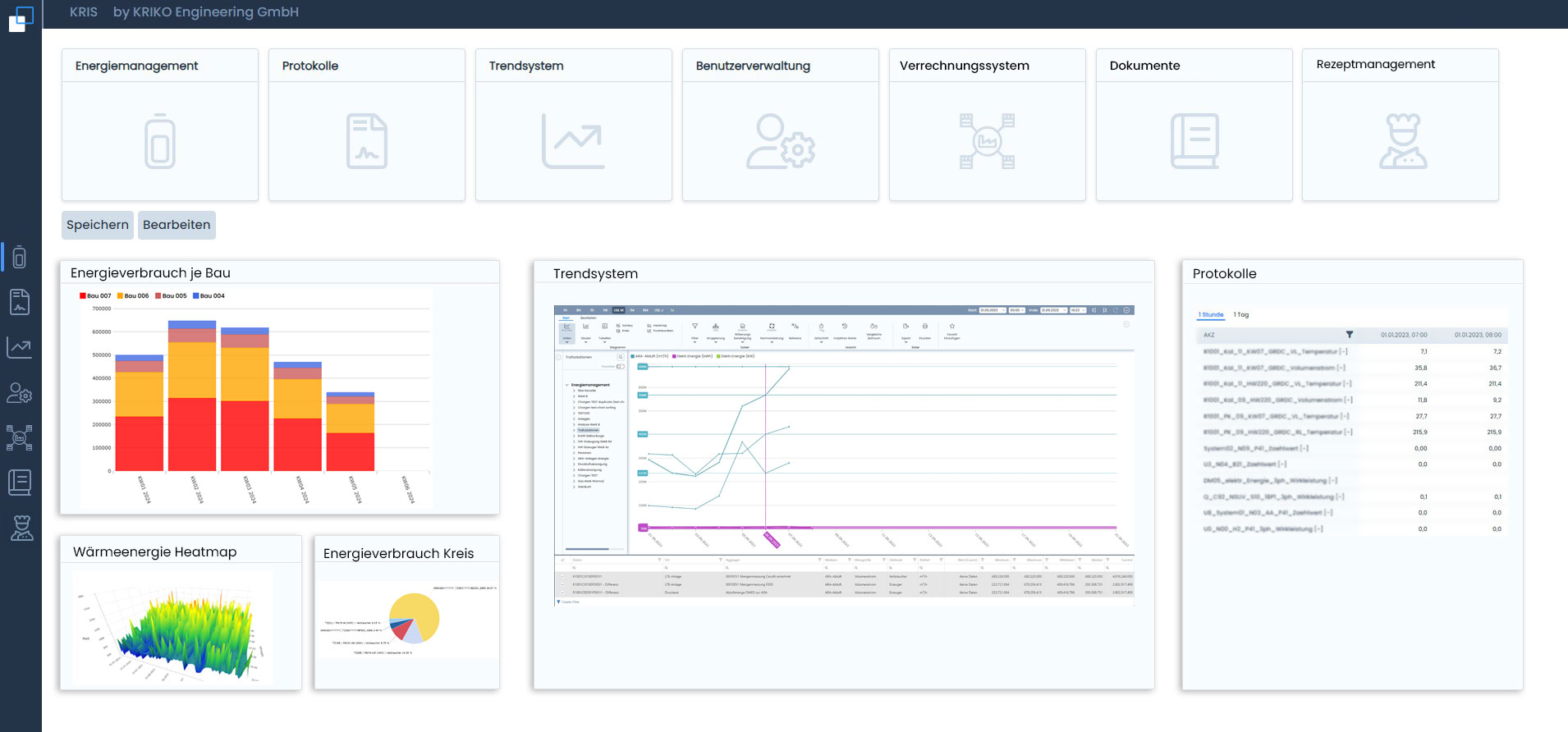
The KRIS Workspace is the heart of our software solution – a modern, user-friendly interface that bundles all applications in one place and gives you full control over your system. Based on new technology and with a clear focus on user experience (UX), the Workspace has been designed to enable you to work intuitively, efficiently, and clearly.

Familiar Design for Quick Orientation

The user interface is based on the proven Windows 11 design and allows immediate access without any training. You can access your authorized apps directly via the quick selection bar on the left. The central home icon takes you back to the main workspace at any time.

Central Navigation in the Title Bar

All key system functions are conveniently located in the top bar:

  • Secure user logout
  • Quick password change
  • Multilingual interface
  • Selectable display modes (Light, Dark, Gray)

Apps at a Glance – Customized and Flexible

All installed apps are clearly displayed in tiles at the top of the workspace. This ensures quick orientation and immediate access.

Bottom – Your Personal Information Center

The bottom area is particularly flexible. Here you can:

  • Add Widgets from your apps
  • Position and resize containers freely
  • Display interactive content – from bar and pie charts to heat maps

Examples of content that can be displayed:

  • Energy management data
  • Network monitoring
  • Key figures for your systems
  • Network infrastructure
  • Weather forecasts
  • Web interfaces for energy meters
  • All HTML5-based content – easily integrated via URL

Why KRIS

Advantages of the KRIS Workspace

Maximum clarity: A modern UI design based on Windows 11 standards ensures immediate orientation and a structured presentation of information without visual clutter.

Intuitive Usability: Self-explanatory navigation and logical menu structure enable productive work from the very first minute—without the need for extensive training or onboarding.

Centralized system integration: Bring all relevant tools, data sources, and external systems together on a single platform. No more media breaks or parallel applications.

Customizable: Design your workspace exactly to your process requirements: freely positionable widgets, scalable containers, and customizable dashboards.

Role-based access control: Each user sees only the apps and data they are authorized to access—maximum security with optimal user guidance.

Platform-independent integration: HTML5-based architecture allows the integration of any web content, energy meter interfaces, and third-party systems via URL—without any programming effort.

Get started with KRIS now

Our team of experts will help you integrate KRIS Workspace into your existing IT infrastructure.

Book a free initial consultation directly - We’ll analyze your needs and present concrete solutions for your business.

Contact us now – Send us your questions via email or phone.

Your direct

Contact Persons


Other KRIS apps